
Cardano governance · Gero Dashboard 2.7.1
Cardano governance: delegate, track, or become a DRep.
Every Voltaire era governance action with tallies for DReps, SPOs and the Constitutional Committee, a directory of every registered DRep, and a watchdog on your delegation. Signed in the wallet or on your Ledger, Trezor or Keystone.
- 1,684 registered DReps
- Three voting bodies
- Never ranked by voting power
Reimburse Ikigai deposit
Threshold 67% · metadata verified
My governance
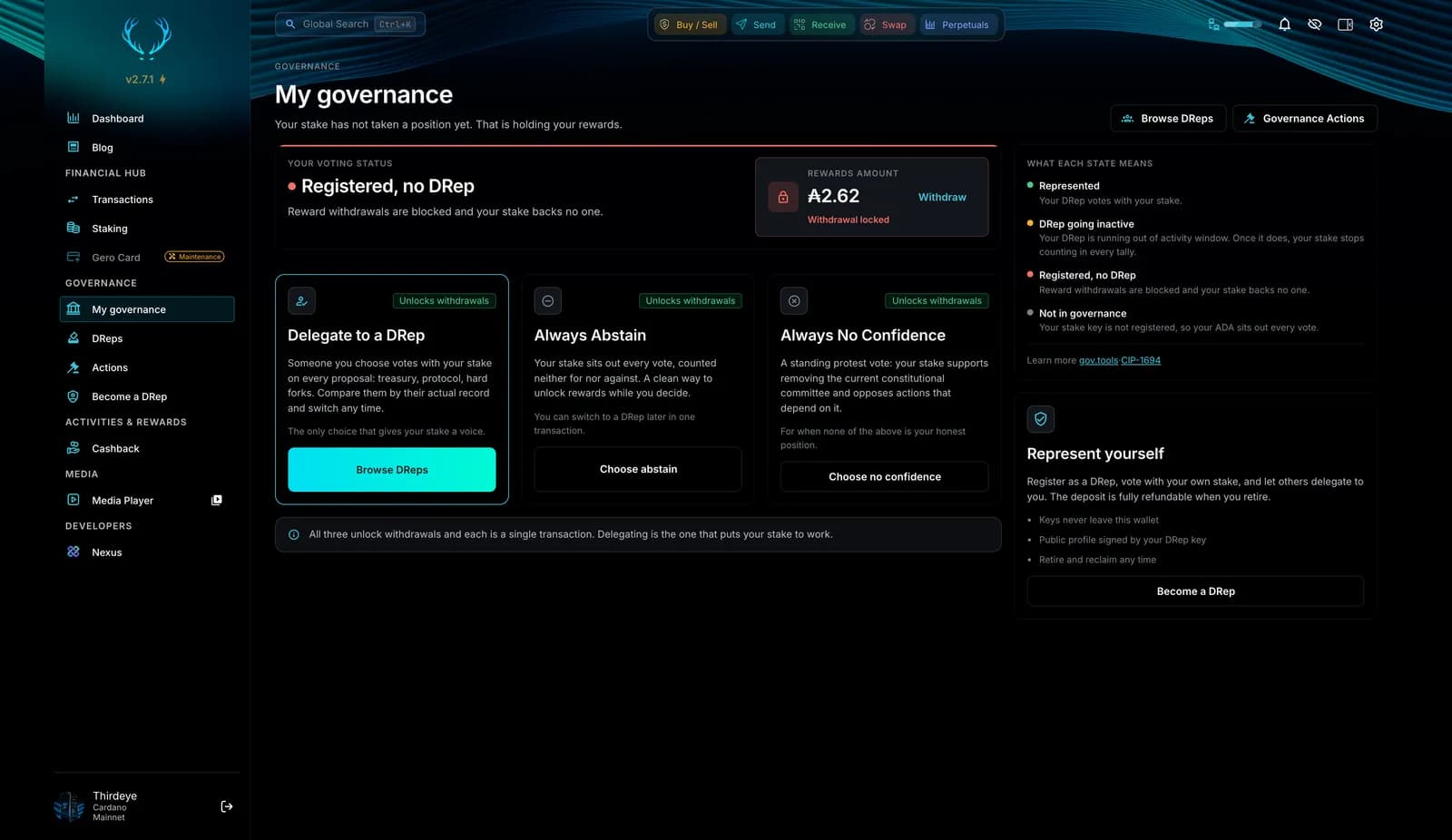
My governance: what your stake is doing, in one place
A stake that has not taken a position is holding its own rewards. This page shows your position and gives you the three ways to fix that, each a single transaction.
- Your voting status at a glance: represented, DRep going inactive, registered with no DRep, or not in governance yet.
- Three ways to put your stake to work, each one transaction: delegate to a DRep, always abstain, or always no confidence. All three unlock reward withdrawals.
- Changes show as in flight until they confirm, and stopping a delegation holds a pending state instead of snapping back.
- CIP-0149 DRep support: see whether you send your DRep a share of your rewards, and start or cancel it here.
DRep directory
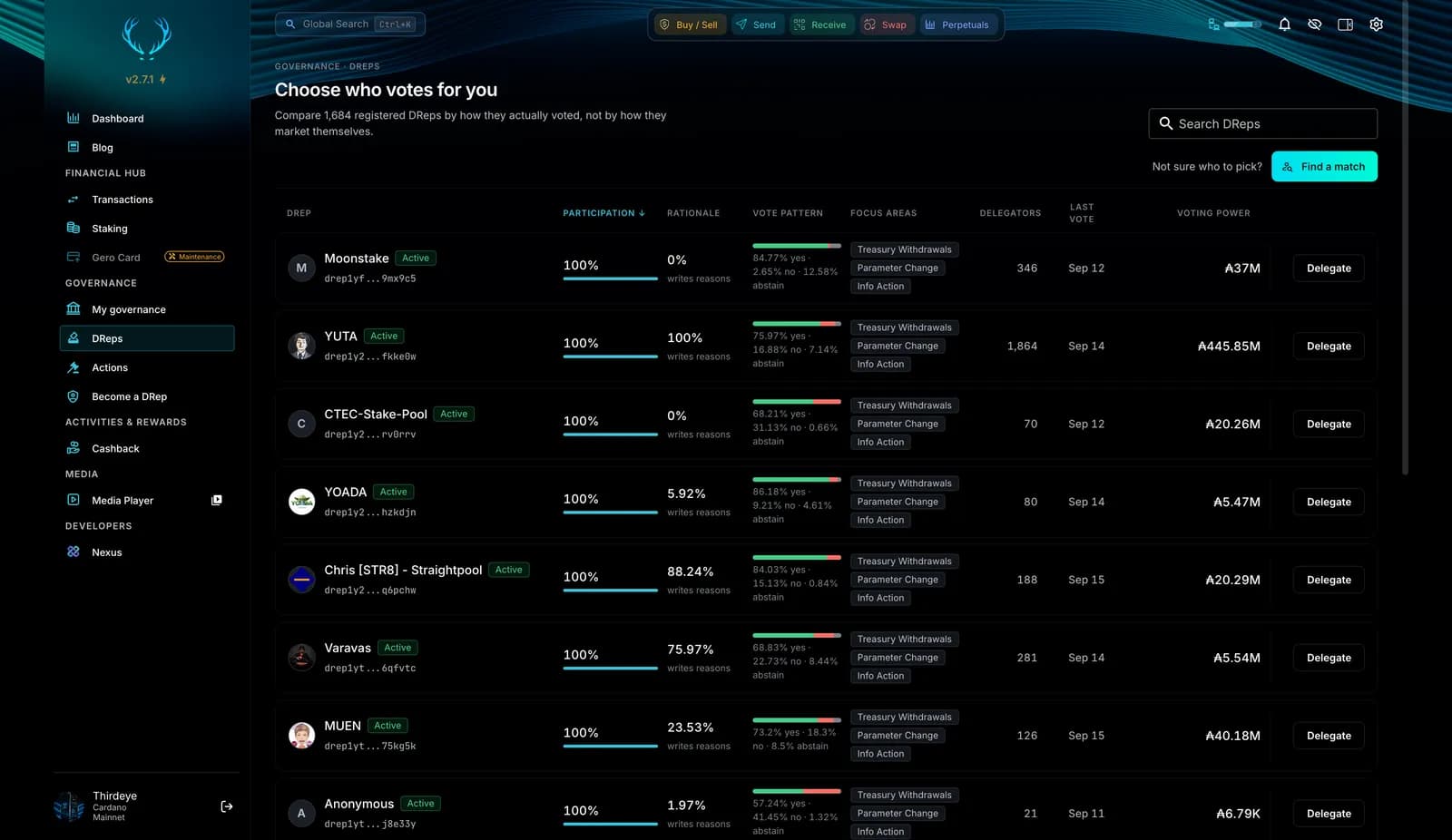
Choose who votes for you
Compare 1,684 registered DReps by how they actually voted, not by how they market themselves.
- Participation and rationale rate for every DRep, with the date of the last vote, so you can see who shows up and who explains.
- Vote pattern and focus areas: the yes, no and abstain split, and whether a DRep votes on treasury withdrawals, parameter changes or info actions.
- Voting power is shown, never used to rank. The default sort is participation, there is no composite score, and Find a match uses a seeded shuffle.
- Delegate from the row. Unknown data renders as unknown, never as zero.
Find your match
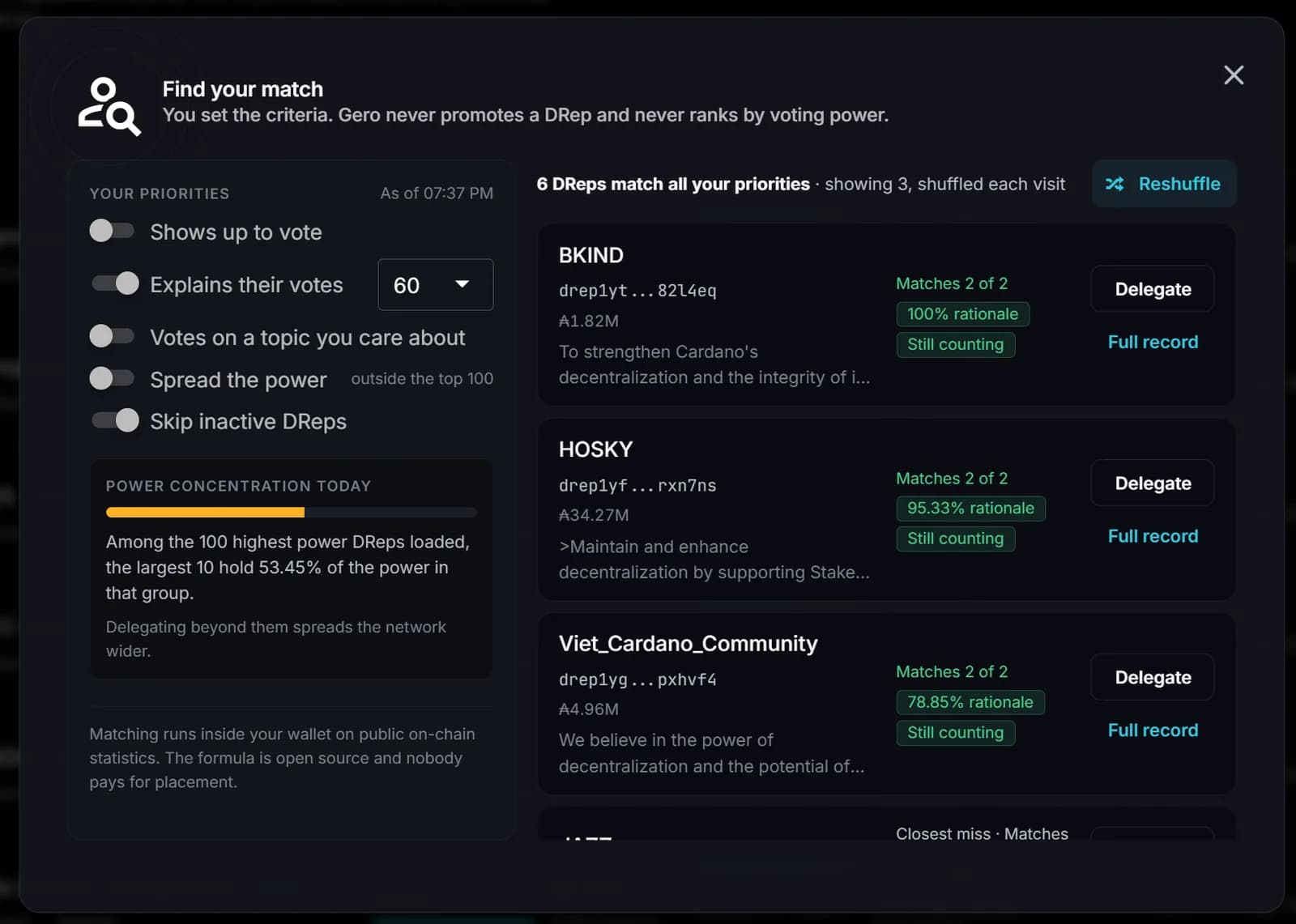
Find a DRep who matches your priorities
Set what matters to you and the wallet shows a few DReps who fit, shuffled on every visit. Gero never promotes a DRep and never ranks by voting power.
- Your priorities, not a score: shows up to vote, explains their votes, votes on a topic you care about, spreads the power beyond the top 100, skips inactive DReps.
- A power concentration meter shows how much of the loaded voting power the ten largest DReps hold, so you can see why delegating beyond them spreads the network wider.
- Matching runs inside your wallet on public on-chain statistics. The formula is open source and nobody pays for placement.
- Delegate or open the full record from the match card, with the rationale rate and the vote count that is still counting.
Governance actions
Every governance action, and where it stands
Browse every on-chain action with its type, status and time left, then open one to read the case for it and see how each body has voted.
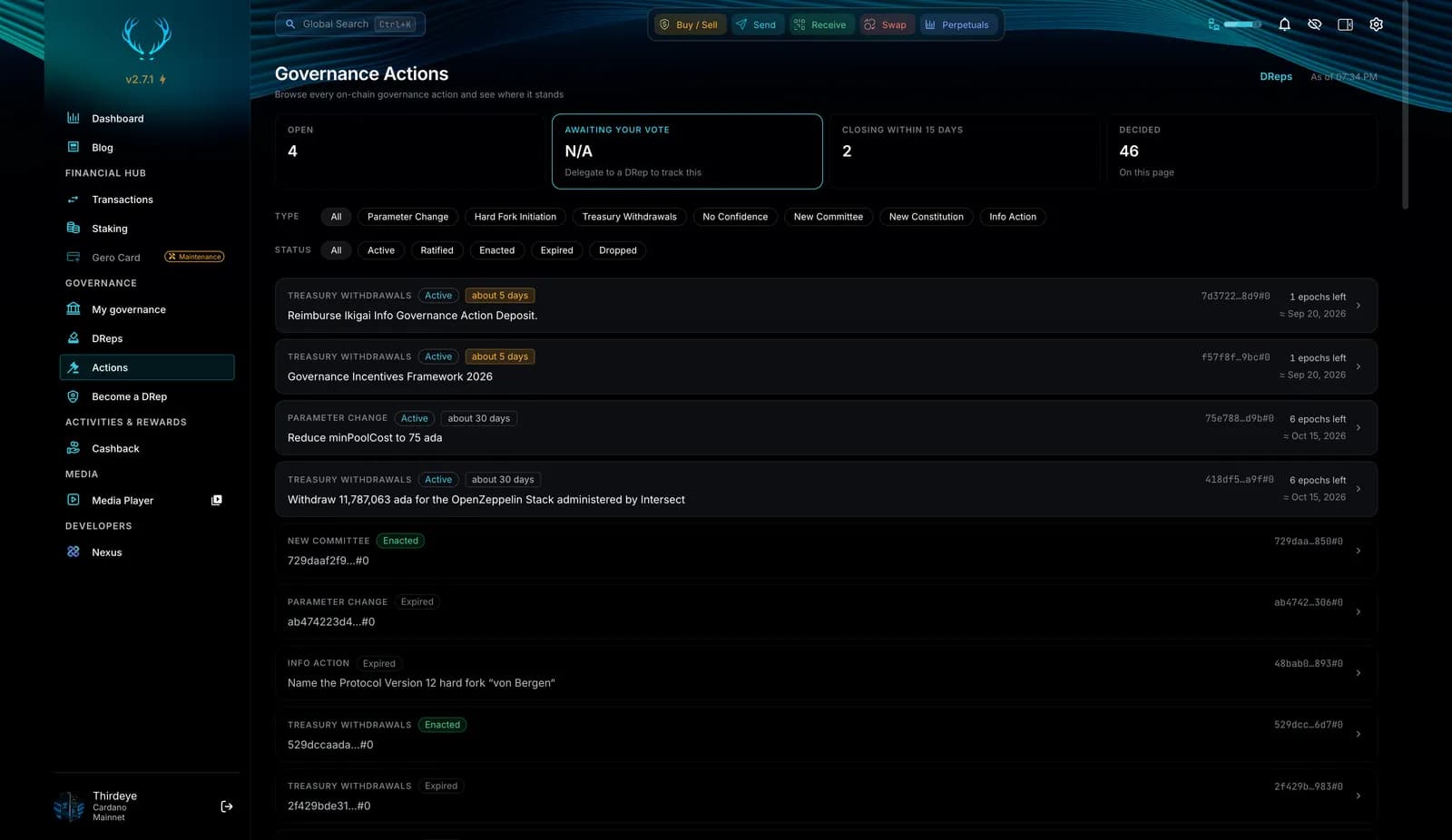
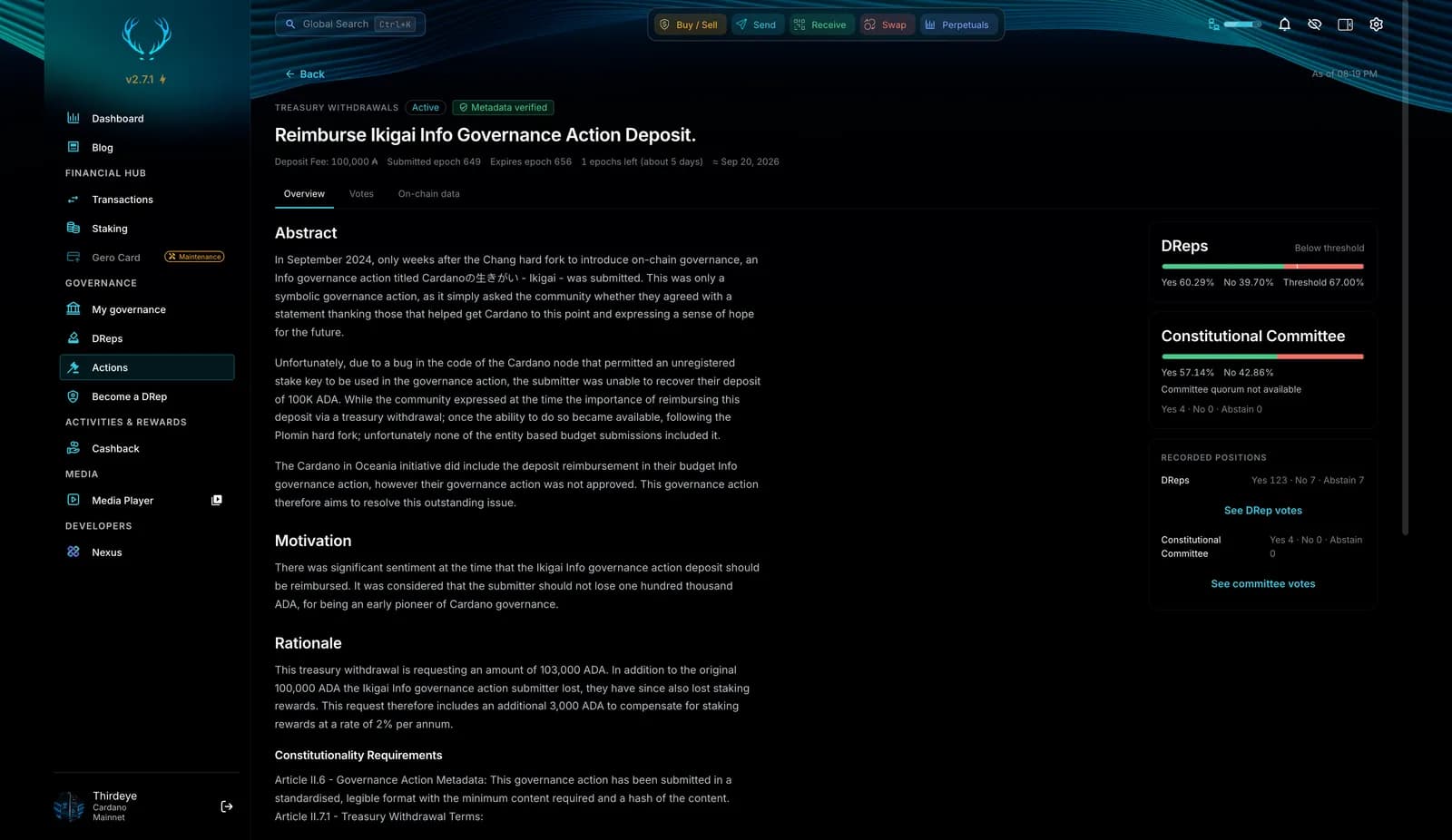
- Open, awaiting your vote, closing within 15 days, decided: the counts on top tell you where to look first.
- Filter by type and status: parameter change, hard fork, treasury withdrawal, no confidence, new committee, new constitution, info action; active, ratified, enacted, expired, dropped.
- Abstract, motivation, rationale and constitutionality straight from the action metadata, verified against the on-chain hash.
- Tallies per body with the threshold, the recorded position of each voter, and Read why on any vote to open its rationale in the wallet.
The record
Read the record before you delegate
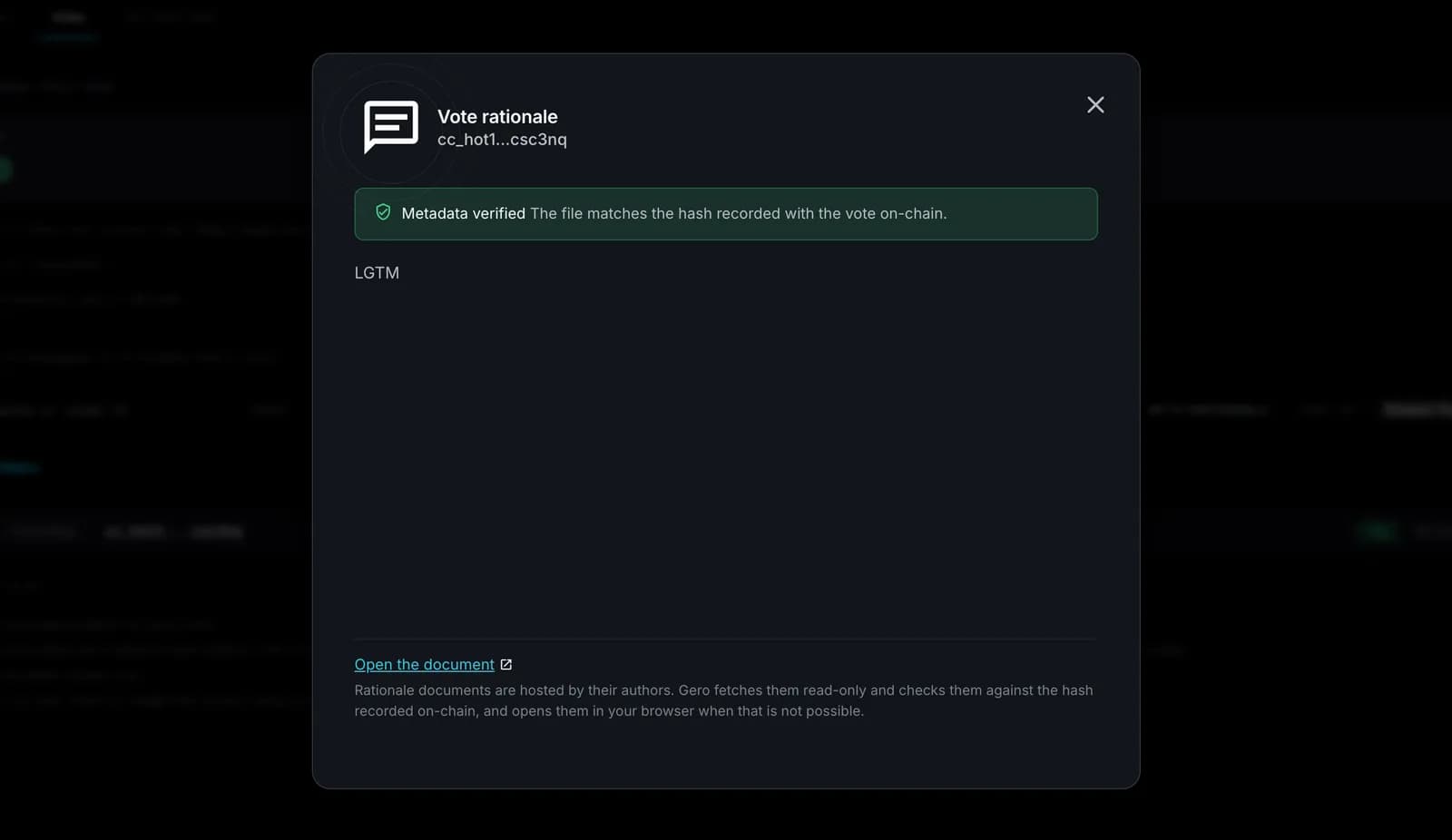
Every DRep has a profile with their participation, how many votes they explained, where they vote and the full voting record. Every explained vote opens in the wallet, checked against the hash recorded on-chain.
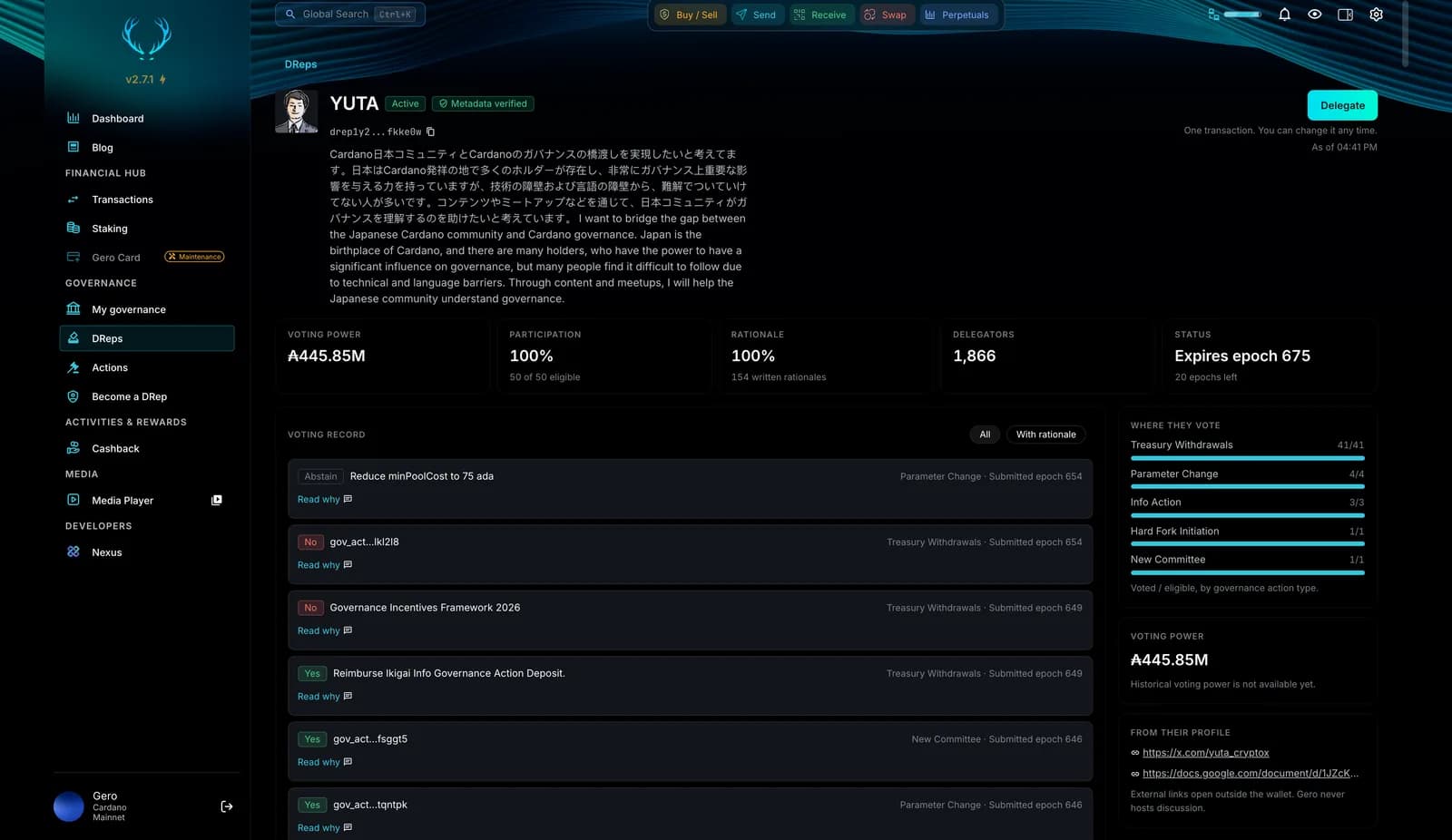
- Participation, rationale count and last vote on top of every profile, with a verified badge when the CIP-119 metadata checks out.
- Where they vote: the split across treasury withdrawals, parameter changes, info actions and the rest, so you know whether they show up for what you care about.
- Read why on any vote opens the rationale inside the wallet. Documents are fetched read-only and checked against the on-chain hash; if the check fails, the wallet says so.
Represent yourself
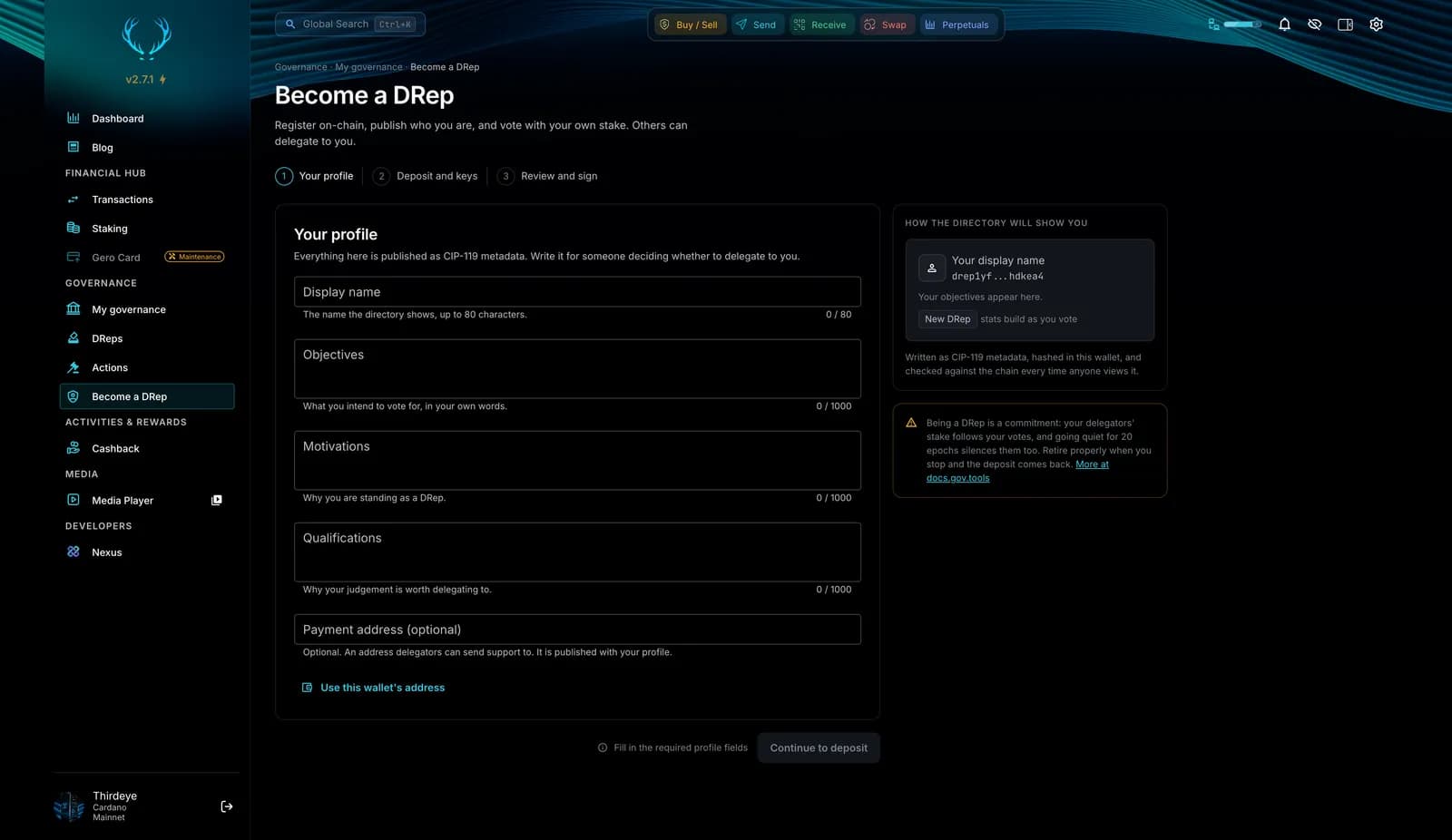
Become a DRep in three steps
Register on-chain, publish who you are, and vote with your own stake. Others can delegate to you.
- 1
Your profile
Display name, objectives, motivations, qualifications and an optional payment address, published as CIP-119 metadata for anyone deciding whether to delegate to you.
- 2
Deposit and keys
The deposit is fully refundable when you retire. Keys never leave the wallet, and the profile is signed by your DRep key.
- 3
Review and sign
GeroWallet checks the metadata hash byte for byte before the deposit is locked, then you sign in the wallet or on your Ledger, Trezor or Keystone.
Built to be trusted
Facts from the chain, never a nudge
Watchdog on your delegation
Alerts when your DRep goes inactive, retires or stops publishing rationales, computed from on-chain facts only. Each alert states the fact and offers the directory. It never picks a replacement for you.
Rationales verified in the wallet
Read why opens the CIP-100 and CIP-108 rationale inside GeroWallet. A green banner means the document hash matches the on-chain anchor, amber means it could not be verified. Markdown is escaped before it renders.
A window, not an actor
No named recommendations, no ranking by voting power, no score. A wallet that nudged you toward particular representatives would be taking part in governance instead of showing it to you.
Step by step
How to Take Part in Cardano Voting
- 01
Open the Governance hub
In GeroWallet 2.7.1, open Governance from the wallet drawer. My governance shows what your stake is doing today: whether you are delegated, to which DRep, and how that DRep has voted. Governance features roll out behind feature flags and depend on network support, so the hub shows what is enabled for your wallet.
- 02
Browse actions and read verified rationales
Open any governance action to see separate tallies for DReps, SPOs and the Constitutional Committee, plus the recorded position of each voter. Press Read why on a vote to open its rationale inside the wallet. A green banner means the document hash matches the on-chain anchor, an amber banner means it could not be verified.
- 03
Choose a DRep or become one
Pick a DRep from the directory of every registered mainnet DRep, sorted by participation, rationale rate or last vote, or choose the predefined Abstain or No Confidence options. If you would rather vote yourself, register as a DRep with the CIP-119 profile builder. GeroWallet builds the certificate and you sign it in the wallet or on your Ledger, Trezor or Keystone.
- 04
Track it with the watchdog
Your delegation shows as in flight until it confirms, and stopping it holds a pending state instead of snapping back. From then on the delegation watchdog alerts you if your DRep goes inactive, retires or stops publishing rationales, and points you back to the directory.
Cardano governance questions
What is Cardano governance?
Cardano governance (CIP-1694, the Conway era) is the on-chain system for deciding protocol parameter changes, treasury withdrawals, hard forks and constitutional changes. Each governance action is voted on by three bodies: DReps, stake pool operators (SPOs) and the Constitutional Committee. ADA holders take part by delegating their voting power to a DRep or by registering as a DRep themselves.
What is the Voltaire era in Cardano governance?
Voltaire is the governance era of Cardano. The Chang hard fork in September 2024 introduced the Conway ledger era and CIP-1694, and the Plomin hard fork in January 2025 switched on full on-chain voting by DReps, stake pool operators and the Constitutional Committee. Since then every protocol parameter change, treasury withdrawal, hard fork and constitutional change is decided through governance actions on-chain, which is what the Governance hub in GeroWallet shows.
How does Cardano voting work for ADA holders?
Individual ADA holders do not cast votes on governance actions themselves under CIP-1694. You delegate your voting power to a DRep of your choice, or to the predefined Abstain or No Confidence options, and that DRep votes on your behalf. If you want to vote yourself, register as a DRep. In GeroWallet 2.7.1 a registered DRep votes from the action list and can select several actions at once.
What is a DRep?
A Delegated Representative (DRep) is anyone who has registered on-chain to vote on governance actions with the voting power delegated to them. DReps publish a CIP-119 profile and can attach a rationale to each vote explaining their position. GeroWallet lists every registered mainnet DRep, 1,684 at the time of writing, with their participation, rationale rate, vote pattern, focus areas and last vote.
How does GeroWallet decide which DReps to show first?
It does not rank them for you. The directory covers every registered mainnet DRep and sorts across the whole register by participation, rationale rate or last vote. The default sort is participation, never voting power. There is no composite score, no named recommendations, and the match tool uses a seeded shuffle. A wallet that nudged you toward particular representatives would be an actor in governance rather than a window onto it. Where data is unknown, GeroWallet shows unknown, not zero.
What is a DRep's participation rate?
Participation is how many of the governance actions a DRep could have voted on it actually voted on, computed from on-chain votes only. GeroWallet shows it for every registered mainnet DRep next to the rationale rate and the date of the last vote, and the directory sorts by participation by default so active representatives surface first regardless of their voting power.
What is the delegation watchdog?
The watchdog follows the DRep you are delegated to and alerts you on inactivity, retirement or a drop-off in published rationales. Every alert is computed from on-chain facts only. It states what happened and offers the DRep directory so you can choose again; it never suggests a replacement.
How are voting rationales verified?
DReps publish rationales as CIP-100 and CIP-108 JSON-LD metadata and anchor the document hash on-chain. When you press Read why, GeroWallet loads the document (ipfs:// links go through Gero's proxy), recalculates the hash and compares it with the anchor. A green banner means it matches; an amber not verified banner means it does not match or no hash exists. The markdown is escaped before it is rendered, so a rationale cannot inject content into the wallet.
What is CIP-0149 DRep support?
CIP-0149 lets you send your DRep a share of your staking rewards as compensation for their work. My governance shows whether you are currently doing this and lets you start or cancel it in one place.
How do I become a DRep in GeroWallet?
Open Become a DRep in the Governance hub. The three steps are your profile, deposit and keys, and review and sign. The CIP-119 profile builder produces your metadata, GeroWallet verifies the hash byte for byte before the deposit is locked, and the registration certificate is signed in the wallet or on your Ledger, Trezor or Keystone. Once confirmed you appear in the directory and can vote from the action list. The deposit is fully refundable when you retire.
Can I use a hardware wallet for governance?
Yes. Vote delegation, DRep registration and votes are certificates or transactions that GeroWallet builds and your Ledger, Trezor or Keystone signs on its own screen. Trezor connects over WebUSB with no Bridge daemon. Your keys never leave the device, and GeroWallet's source is public on GitHub so you can check how the certificates are built.
Does Midnight have governance too?
Midnight is a separate, integrated partner chain with its own token model: NIGHT (and cNIGHT held on Cardano) generates DUST, the resource that pays for private transactions. GeroWallet handles DUST generation in-wallet. Cardano governance is decided with ADA on Cardano; see the Midnight wallet page for how NIGHT and DUST work.
Governance is one part of the wallet
Staking
Earn rewards while your staked ADA carries the voting power you delegate to a DRep.
Swap
Swap on Gero's own aggregator across Cardano DEXs.
Midnight
Generate DUST from cNIGHT in your Cardano wallet, with no bridge and no portal.
Market data
Every Cardano DEX in one table, with charts, order books and swaps.
Put your stake to work in Cardano governance
Free on Chrome, Brave and Edge. Non-custodial, public source code, hardware wallet ready.